


CAD Batch Printing Wizard (CAD Batch Printing Software) V9.0 Professional Edition
CAD Batch Drawing Wizard Professional Edition is an efficient and practical cad drawing batch printing tool that can help users fully automatically identify and print drawings, and can also convert drawings into files in PDF, JPG, PNG, DWG and other formats. This software is easy to use. Even if there are multiple drawings in one dwg or multiple drawings scattered in multiple dwg files, it can easily help you print.
function introduction
1. Intelligent and fast frame recognition. You don't need to make any modifications to the drawings. You can fully automatically and intelligently identify ordinary frames at high speed. The frames can be composed of lines, polylines, two-dimensional polylines, areas, viewports, proxy entities, block references or external references.
2. Batch printing in full space, batch printing in model space with multiple drawings; batch printing in multiple layout spaces with multiple drawings or single drawings.
3. Batch printing of multiple documents, open multiple CAD drawing files in turn, identify and print the frames in the above specified space.
4. The official version of CAD batch printing software can not only print drawings directly, but also convert drawings into PDF, JPG, PNG, plt, DWG, DWFx, XPS and other format files.
5. Comprehensive functions and simple operation. It can automatically rotate CAD drawings according to the printer paper direction to obtain the best placement effect.
instructions for use
1. AutoCAD2007 or later must be installed before installing this software.
2. Run "Setup.exe" and install as prompted.
2. After completing the previous step, you will be prompted to install the "pdfFactory 3.52 Chinese version" virtual printer.
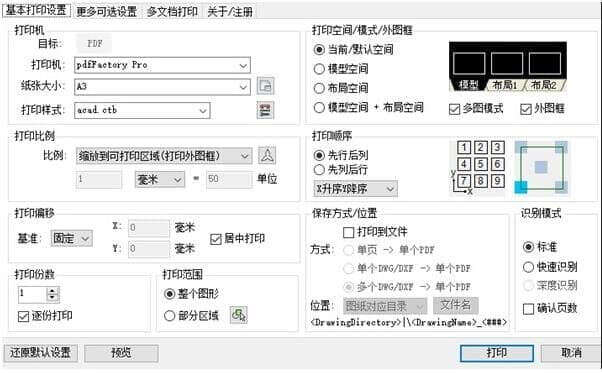
3. After completing the first two steps, reopen AutoCAD. Enter the "QP" command on the AutoCAD command line, and the "CAD Batch Drawing Wizard" form will pop up.
Download address: soft.xitongxz.net/202202/CADdtjl_V9.0_XiTongZhiJia.zip
延伸阅读:
暂无内容!
评论列表 (0条):
加载更多评论 Loading...